SpySense — Hidden Camera Detector App That Actually Works
SpySense turns your phone into a wireless surveillance analyzer. Spot hidden cameras in hotels, rentals, and unfamiliar spaces — in under 60 seconds, with no special hardware and no signup.
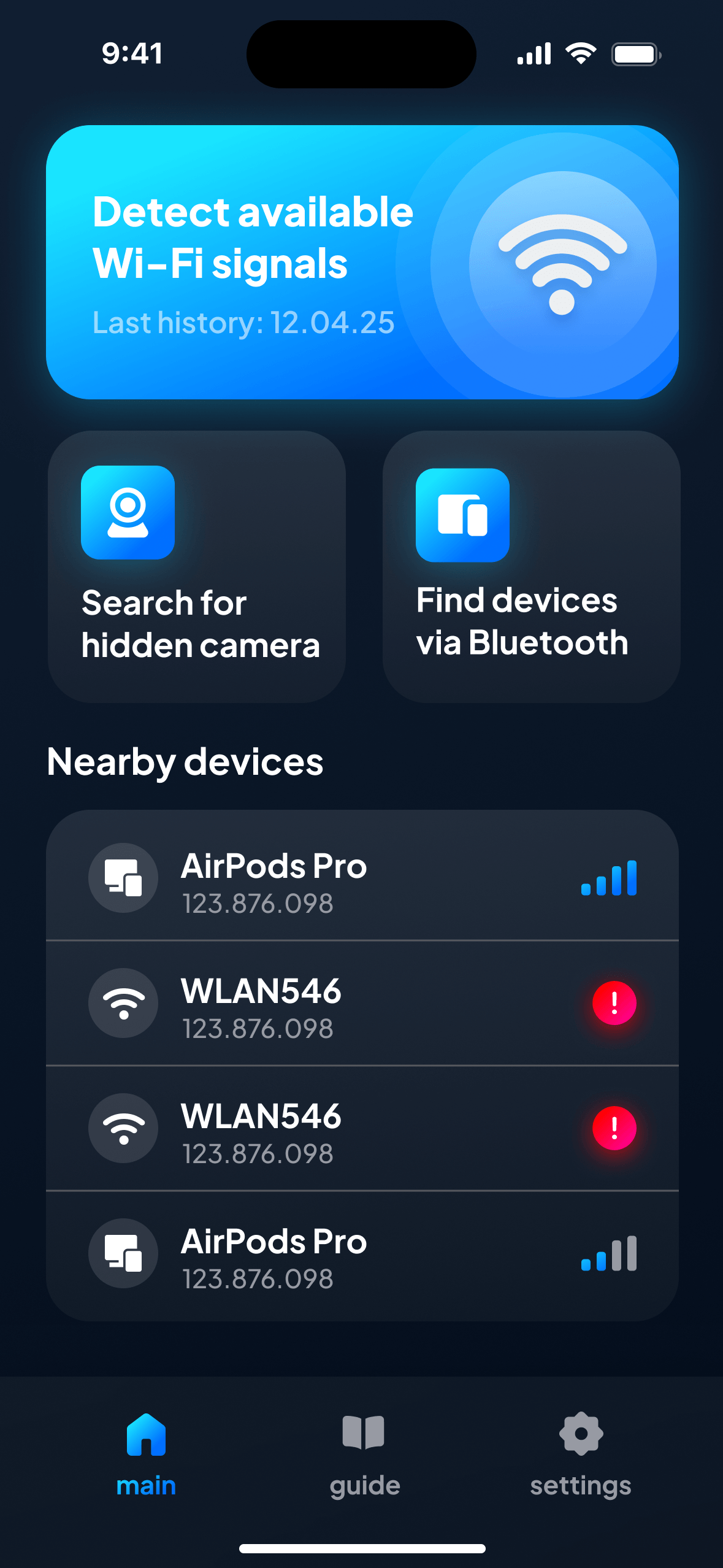
Your phone already has the hardware. SpySense adds the security intelligence.
The vast majority of consumer-grade spy cameras transmit video over wireless or Bluetooth — they have to, otherwise the person recording can’t access the feed. That transmission is a vulnerability. SpySense exploits it — making your phone a reliable hidden camera detector.
Wi-Fi audit — a useful security tool
The moment you connect to a property’s wireless, SpySense maps every device sharing that connection. Most routers, smart TVs, and thermostats identify themselves by manufacturer. An unnamed device with no recognisable vendor string, sitting on the same LAN as the guest access point, is worth a closer look — and SpySense flags it automatically.
Wireless signal radar
Not every camera connects to the property’s own router. Some create their own ad-hoc hotspot or broadcast on a separate 2.4 GHz or 5 GHz channel. SpySense listens for those orphan signals in real time as you walk through the room. If a signal gets stronger as you approach the bookshelf, that bookshelf deserves your attention.
Finding hidden transmitters by profile
Raw signal data isn’t helpful if you can’t tell the router from the alarm clock. SpySense cross-references MAC addresses, vendor prefixes, and traffic patterns to label each device by likely type and build a unique profile for it. A device tagged “Samsung TV” on a hotel LAN is almost certainly the room TV. An unlabelled transmitter with no manufacturer data, aimed at the bed, is not.
A room-by-room guide to keeping any unfamiliar space safe.
Most people check in, drop their bags, and start using the room. A 60-second scan before you unpack changes everything. Here’s where to point your phone — and why.
The bedroom
Walk the phone slowly along both sides of the bed, then across the headboard. Pay special attention to anything with a direct line of sight to the bed: alarm clocks, USB charging hubs, picture frames, ceiling fixtures directly overhead. A camera hidden in a clock radio will broadcast just like any other wireless transmitter — SpySense picks up that signal before your eyes would.
The bathroom
The most invasive placement — and the most reported on short-term rental sites. Scan along the mirror, towel hooks, ceiling vents, and any wall-mounted gadgets. In a bathroom, there is almost never a legitimate reason for a wireless transmitter to be present. If SpySense flags something here, treat it seriously.
Clocks, chargers & other common hiding spots
Consumer-grade spy cameras are sold pre-built into everyday objects — available on Amazon and similar sites — including USB wall chargers, air purifiers, tissue boxes, power strips, and even water bottles. Some use a magnetic mount for easy placement. What they all share is a wireless transmitter. Move the phone in a wide arc near the ceiling, along shelves, and around desk surfaces. SpySense doesn’t need to see the camera — it hears the signal.
What this tool can find — and what it can’t.
No app catches everything. Knowing the boundaries makes you better at filling the gaps manually.
What SpySense can find
Any device broadcasting over wireless (2.4 GHz & 5 GHz) or Bluetooth within range of your phone — making it an effective spy camera detector. This covers the overwhelming majority of consumer spy cameras, including those hidden inside everyday objects, connected to the host’s router, or running their own rogue hotspot. It also picks up wireless microphones and GPS trackers that broadcast over BLE, improving your overall security on a regular basis.
What SpySense cannot find
Cameras that record to a local SD card and never transmit are invisible to any radio-based tool — phone app or dedicated hardware. The same goes for wired cameras connected by Ethernet or coaxial cable. For those, a manual visual inspection is still your best option: look for pinholes, check reflective glints with a flashlight held close to your eye, and use infrared light to spot lens reflections. Our blog provides a step-by-step visual inspection guide.
SpySense vs. physical detectors — which tool do you need?
Dedicated RF detectors range from about $20 to over $100. They cover a broader frequency range and some include infrared lens-finder LEDs. But they also come with trade-offs most reviews don’t mention.
Why a mobile app is enough for most users
Your phone is already in your pocket. There is no extra gadget to charge, pack, or figure out at 11 p.m. after a long flight. SpySense launches in seconds and uses radios your phone already has — so there is zero learning curve and zero luggage overhead. For the typical hotel stay or short-term rental booking, a wireless sweep catches the cameras most likely to be there: consumer-grade Wi-Fi cameras. The bottom line — a spy camera detector app on your phone is useful enough to improve your safety on every trip.
When hardware earns its place
If you travel to high-risk locations regularly — investigative journalists, corporate executives, diplomats — a dedicated wideband RF system that covers frequencies outside standard wireless bands is a worthwhile addition. Think of SpySense as your always-available first line of defense and a hardware unit as the specialist tool you bring when the stakes justify it.
Four steps. Under a minute.
No calibration, no configuration, no account. Hidden camera detection starts the moment you walk into a new room.
Step 1 — Audit the wireless network
Connect to the property’s Wi-Fi, open SpySense, and tap Start. The app immediately inventories every unit on the connection. Anything without a recognised manufacturer label gets flagged. This takes about 10 seconds and catches cameras that are already sharing the same connection you’re on.
Step 2 — Walk the room for rogue signals
Hold your phone out and walk slowly through the space — along walls, near the ceiling, around furniture. SpySense monitors signal strength in real time. A rogue transmitter hiding inside a USB charger will show a spike as you get close. Cover the bedroom, bathroom, and any area where you expect privacy.
Step 3 — Review the flagged list
Tap any item SpySense has highlighted. The detail screen shows the manufacturer (if available), signal type, and a plain-language explanation of why it was flagged. In most cases, you will see the router, a smart TV, and maybe a thermostat — all expected. It’s the entry that doesn’t match any known pattern that you want to investigate physically.
Step 4 — Act on what you find
If something looks suspicious, do not touch or unplug it — that may destroy evidence. Photograph it and the SpySense result. Contact the owner or hotel management first, then local police if needed. If you’re using a short-term rental service, flag the issue through the booking platform — most major platforms ban indoor cameras entirely, and violations can result in the host’s removal from the site.
Airbnb banned indoor cameras. That doesn’t mean users are safe.
In 2026, the largest short-term rental platform announced a global ban on indoor security cameras in all listings — no exceptions, not even in common areas. It was the right move. But a rule change is only as strong as its enforcement.
The camera ban — and why it’s not enough to keep you safe
The ban applies to all indoor cameras, whether or not they’re disclosed. But no third-party platform inspects properties on arrival — guests do. A host who ignores the rule faces consequences only if a guest discovers the camera and files a complaint. The gap between policy and enforcement is exactly where a 60-second SpySense scan fits: it gives you the evidence to hold a property partner accountable.
Your rights if you find a hidden camera
In most US States, recording someone in a private space without consent is a criminal offence — not just a platform violation. If you find a camera, you are likely entitled to a full refund from the booking site, and you may have grounds for a police report. Document everything: SpySense’s history feature saves each sweep with a timestamp, which can serve as supporting evidence. Protect your personal data — act immediately.
Hotels are not exempt. While less common, hidden cameras have been found in hotel rooms across budget and mid-range chains. The same scan routine applies: connect to wireless, open SpySense, walk the room.
Download SpySense — free on the App Store.
No signup. No special hardware. Check your next room in under 60 seconds.
Use free. Upgrade when you need history.
Core scanning is always free. Premium adds sweep history, real-time alerts and priority analysis. 3-day free trial on all annual plans.
Free
- Wi-Fi audit
- Wireless signal sweep
- Manual walk-through mode
- Last result only
Annual
- 3-day free trial
- Full sweep history
- Real-time alerts
- Priority signal analysis
- No ads
Prices in USD. Subscriptions auto-renew unless cancelled at least 24 hours before the end of the period.
Common questions about finding hidden cameras
Can a phone app really find hidden cameras?
Yes — with one important caveat. A phone app can pick up any camera that transmits over wireless or Bluetooth, which covers the vast majority of consumer spy cameras sold today. What an app cannot do is spot a camera that records locally to an SD card with no wireless transmission at all. For those, a manual visual inspection is the only reliable method. SpySense handles the wireless side; our blog covers the visual inspection technique.
Is SpySense free?
Core features — wireless audit and signal sweep — are completely free with no time limit and no signup. Premium ($9.99/year or $4.99/week) adds history, real-time alerts, and priority analysis. All annual plans offer a 3-day free trial.
Does SpySense work without Wi-Fi?
Partially. The wireless signal radar works without a connection — it listens for any 2.4 GHz and 5 GHz transmitters in range regardless of whether you are on a network. However, the full audit (which identifies and labels units by manufacturer) requires connecting to the property’s wireless. For the most complete result, connect first, then walk the room.
Where are hidden cameras most commonly positioned?
The most reported positions are bedrooms and bathrooms in short-term rentals. Within those rooms, cameras are typically concealed inside alarm clocks, USB wall chargers, smoke detectors, picture frames, tissue boxes, and air purifiers — everyday objects that don’t attract attention. Any object with a direct line of sight to a bed, shower, or changing area should be checked.
What should I do if I find a hidden camera?
Do not touch or unplug it — that may destroy evidence. Photograph it from multiple angles, take a screenshot of the SpySense result showing the suspicious device, and note its exact spot in the room. Contact the host or front desk first, then file a report with local police. If you booked through a rental platform, flag the issue immediately — indoor cameras violate Airbnb’s global policy and the host faces removal.
Does SpySense work on Android?
SpySense is currently available for iPhone (iOS 12.4 and later). An Android version is in development. If you’re an Android user who wants to be notified when it launches, check our blog for updates.
Can SpySense detect cameras that are turned off?
No — and neither can any other wireless tool. A powered-off camera produces no radio signal. However, most hidden cameras are designed to run continuously or on a motion-trigger, meaning they are almost always transmitting when someone is in the room. If a camera is off, it is also not recording video.
What if a flagged item turns out to be the smart TV?
That happens, and it’s a good sign — it means the system is working. SpySense labels entries by manufacturer where possible, so an item tagged “Samsung TV” or “LG Electronics” on a hotel LAN is almost certainly the room television. The entries to investigate are the ones with no label, no recognised manufacturer, and no obvious reason to be transmitting in that area.
Give your next stay a quick check.
Free on iOS & Android. No signup. 60 seconds between you and a peaceful stay.
About SpySense — the hidden camera finder and hidden camera detector app for your phone
SpySense is a free hidden camera finder app that turns your phone into a wireless surveillance tool. The app audits Wi-Fi connections, picks up rogue wireless signals, and fingerprints transmitters by manufacturer — giving you a clear list of every broadcaster in the room within 60 seconds.
Most consumer spy cameras work by transmitting footage to a remote viewer. That transmission is the weakness SpySense exploits. Unlike lens-based methods that require you to physically spot a reflection, this hidden camera detector works on radio: if something is broadcasting, it shows up — even when it’s hidden inside a USB charger or an alarm clock. Some surveillance tech is invisible to the naked eye, but using the hidden transmitter’s own signal against it has a measurable effect on your safety.
The app is designed for anyone who stays in unfamiliar spaces — travelers, frequent hotel guests, rental users, business travelers, and anyone moving into a new apartment or sublet. No technical knowledge required. Open the app, tap Start, walk the room. SpySense handles the interpretation and alerts you to any suspicious activity. It is equipped to enable even first-time users to improve their travel security and feel safe on arrival.
For repeat travelers, Premium adds sweep history with timestamps, real-time haptic alerts on suspicious signals, and priority analysis — everything you need to make a quick check part of every check-in routine and boost your performance as a security-aware traveler.
The presence of hidden surveillance tech in rental properties is a growing concern. SpySense helps you search for and identify wireless activity that doesn’t belong. Want to go deeper? Our blog covers the physics behind wireless-based finding of hidden cameras, step-by-step visual inspection checklists for hotel rooms, and practical guides for staying safe in short-term rentals.